Posts

Showing posts with the label Plugin

Buildtype icon plugin - for Android

Image
Android and Gradle So I'm now a full time Android developer (yay) and one of the things I've had to get used to, is the Gradle build system. I'm a fan of Maven and I still don't truly understand Google's choice to embrace an immature and complex system like Gradle, although admittedly the meta-programming model has some powerful features... but I digress. Having just completed a Gradle plugin at work to solve an in-house tooling problem, I decided to have a go at another tooling aspect I have run into. Buildtype icon plugin - for Android All too often, non-release builds of an application are provided with hideous looking launcher icons or none at all. For high profile products, calling a graphics designer to have an icon made is not that great a cost, but the majority of projects I see lack sorely in this aspect. While not a huge deal, it looks unprofessional and it also super annoying not being able to tell build types apart when testing various builds on the s...
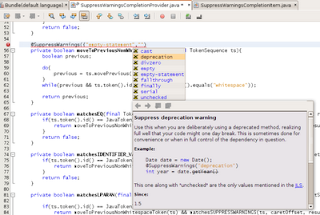
@SuppressWarnings completion

Image
Why it was made Although NetBeans is capable of suggesting and auto-inserting @SuppressWarnings, it doesn't actually provide code completion or documentation for these values. Indeed, as I've blogged about before , it is tricky to track down the exact enumeration and semantics of these magic values. This is due to the fact that they are entirely dependent on the compiler and IDE. This plugin adds support for the values currently supported by NetBeans 6.1, namely "cast", "deprecation", "divzero", "empty-statement", "empty", "fallthrough", "finally", "serial" and "unchecked". It also tries to explain how and when to use them. How it was made Creating plugins for NetBeans is relatively easy if you start by grabbing existing code and have invested in the RCP book. Especially blogs like Geertjan' s and Sandip's are virtual goldmines. So for this one, I used the Geertjan's blog entr...

NetBeans plugin: Special copy/paste

Image
The very little I've had to paste code into this fairly new blog, was enough to give me the idea of creating an extension to NetBeans which would help to remedy this formatting nightmare. Now, in my world, there's approximately a 100:1 ratio between idea and actual realization, so I'd have to salute the awesome OpenIDE API's for making this possible spending just a few late nights and taking just 200 lines of code. Without further ado, I present, my first NetBeans plugin . Special copy/paste The plugin will add a couple of new actions to the context-sensitive popup-menu of the source editor, which will allow you to copy the selected text as preformatted HTML, as well as a CSS version which will preserve the formatting used in NetBeans. Using the "Copy as HTML and CSS" menu as in the above screen dump will result in you being able to paste it directly into a website/wiki/blog and have it display like this: /** * @param args the command line arguments ...